
Looking for a time tracking extension for Zoho CRM? Four extensions on the Zoho Marketplace claim to do the job, but they differ in how recently they were updated, which modules they cover and how they handle billing. This guide compares them side by side so you can pick one in minutes.
Quick answer
Time Tracking for Zoho CRM: timer, manual entry, per-person rates, reports and Leads.
Mojaran lists billing with a minimum billable time. Read its guide for details.
Clientric is free, with a one-button timer on the record.
HelloSend is deprecated and unavailable for use.
How to choose a time tracking extension for Zoho CRM
Before you compare names, run every candidate through the same five checks. They take five minutes and remove most bad choices.
Several listings have almost identical names, so always confirm the developer name before you install.
How recently was each extension updated?
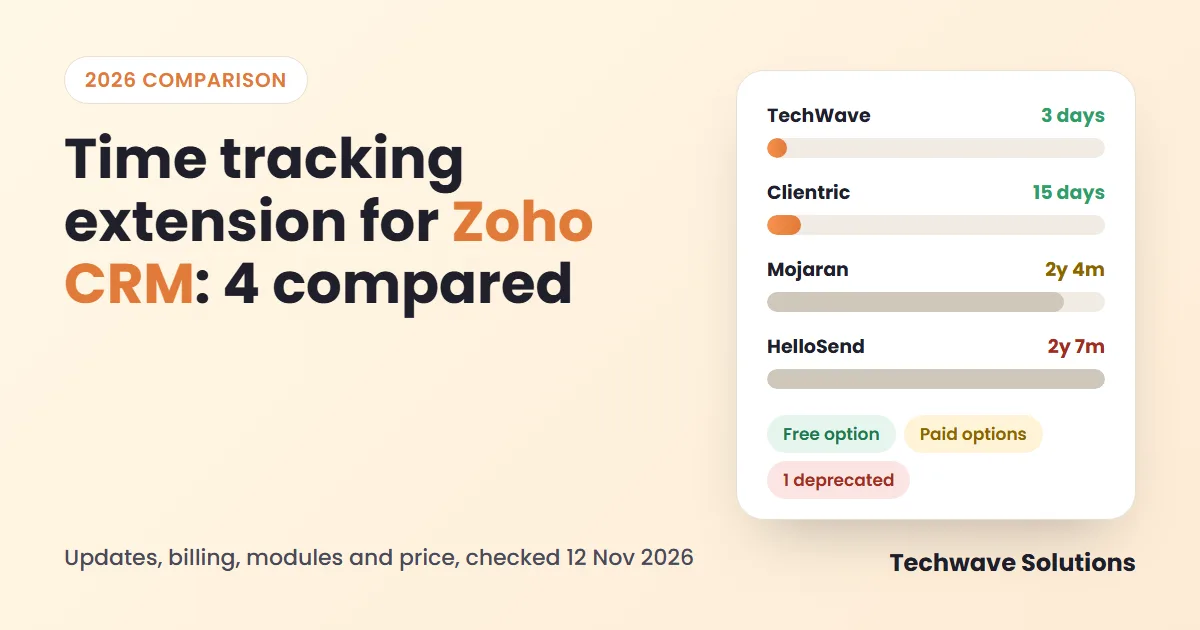
An extension that has not changed for years may not keep up with Zoho CRM updates. Here is the time since each listing’s latest release or publication date, as of 12 November 2026.
Source: Zoho Marketplace listings, 12 November 2026. Shorter bar means a more recent release. Mojaran shows no release after its 7 July 2024 publication.
The four extensions in detail
Time Tracking for Zoho CRM
Timer and manual entry on Deals, Leads, Contacts and Accounts. Hours and billable amounts use each person’s hourly rate, which is saved with every entry. A Reports tab shows charts and breakdowns with Excel, PDF and CSV export. It runs inside Zoho CRM with no separate login or external app.
Good to know
- Widest feature set of the four
- Rate saved per entry, so old billing stays safe
- Freelancers can be added as Time Loggers without a CRM seat
Watch out
- Newly published, so no reviews yet
- Paid; price shown on the Marketplace only
- Time tracking only, not a project manager
Time Tracker Extension for Zoho CRM
The listing says it tracks time, automates billing from hourly rates and minimum billable time, and manages manual entries, with billable and non-billable tracking. The vendor links an admin guide, help documentation and case studies.
Good to know
- Minimum billable time is listed
- Billable and non-billable tracking
- Vendor documentation and case studies
Watch out
- Supported modules and reports are not listed
- No later release shown after v1.0
- Paid; no reviews
Time Tracker for Zoho CRM
You open a record, click the Time Tracker button at the top right and start the timer, which keeps running in the background. It records time on Contacts, Deals and Accounts and can charge amounts from an hourly rate. The listing links user guides and an FAQ.
Good to know
- Free
- One-button timer on the record
- Updated recently (28 Oct 2026)
Watch out
- Manual entry, billable flag and reports are not listed
- Leads are not in the module list
- One hourly rate in the description; no reviews
Time Tracker Extension for Zoho CRM
The listing describes automatic time logging for agents on leads, with reports for billing and payroll. The Marketplace page now states: “This extension is deprecated and unavailable for use.” Its name is almost identical to Mojaran’s, so check the developer name before you install anything.
Good to know
- Included only because it still shows up in search
Watch out
- Deprecated and unavailable
- Last release 11 Apr 2024
Feature comparison
This table uses only what each Marketplace page states. Green means listed, amber means partly described, grey means not listed.
| Feature | TechWave | Mojaran | Clientric | HelloSend |
|---|---|---|---|---|
| Timer | Start, pause, resume, end | Tracking listed, timer not described | One button on the record | Automatic time logging |
| Manual entry | Yes | Yes | Not listed | Not listed |
| Billable / non-billable | Yes | Yes | Not listed | Not listed |
| Billing from hourly rate | Rate per person | Yes, plus minimum billable time | Hourly rate | Reports for billing |
| Old entries safe after a rate change | Rate saved per entry | Not listed | Not listed | Not listed |
| Modules | Deals, Leads, Contacts, Accounts | Not listed | Contacts, Deals, Accounts | Not listed |
| Reports and export | Charts, Excel, PDF, CSV | Not listed | Not listed | Time reports |
| Freelancers without a CRM seat | As Time Loggers | Not listed | Not listed | Not listed |
| Price on Marketplace | Paid | Paid | Free | Free |
| Status on 12 Nov 2026 | Active, v1.2 | Available, v1.0 | Active | Deprecated |
Which one fits you?
- You need the full set (timer, manual entry, per-person rates, reports, Leads, freelancers): choose Time Tracking for Zoho CRM.
- You bill with a minimum time per entry: look at Mojaran and read its admin guide first.
- You only need a free timer on Contacts, Deals or Accounts: try Clientric.
- You found HelloSend in search: skip it, it is deprecated.
Whichever you pick, trial it with the team for a week. The best extension is the one your team actually uses.
Test any extension in 10 minutes
- Start a trial or install from the Marketplace in a sandbox.
- Create one task and one test person with an hourly rate.
- Log time on a Deal and on a Lead, once with the timer and once manually.
- Change the hourly rate and check that old entries do not change.
- Open the report and look for totals by person and by task.
Frequently asked questions
What is the best time tracking extension for Zoho CRM?
It depends on what you need. Time Tracking for Zoho CRM lists the widest feature set: timer, manual entry, per-person rates, a Reports tab and support for Deals, Leads, Contacts and Accounts. Mojaran lists minimum billable time. Clientric offers a free one-button timer. Test any of them with your own data first.
Is there a free time tracking extension for Zoho CRM?
Yes. Clientric’s Time Tracker for Zoho CRM is listed as free on the Zoho Marketplace. HelloSend’s extension is also listed as free, but it is deprecated and unavailable for use, so do not plan around it.
Which extensions work on Leads?
Of the four listings, only Time Tracking for Zoho CRM states support for Leads (Deals, Leads, Contacts and Accounts). Clientric lists Contacts, Deals and Accounts. Mojaran does not list its modules on the Marketplace page.
What does minimum billable time mean?
It means each time entry is billed for at least a set amount of time, for example 15 minutes, even if the work took less. Mojaran’s listing mentions billing based on hourly rates and minimum billable time.
Can I try an extension before I pay?
The paid listings (TechWave and Mojaran) offer a Marketplace trial request. Clientric is free to install. Run the 10-minute test above in a sandbox or on a few test records before you roll out to the team.
Should I install the HelloSend time tracker?
No. The Marketplace page says the extension is deprecated and unavailable for use. It appears in search, which is why it is included here.
Sources
- Time Tracking for Zoho CRM, TechWave Solutions (Zoho Marketplace)
- Time Tracker Extension for Zoho CRM, Mojaran (Zoho Marketplace)
- Time Tracker for Zoho CRM, Clientric (Zoho Marketplace)
- Time Tracker Extension for Zoho CRM, HelloSend, deprecated (Zoho Marketplace)
Want to see how ours works?
Read the Time Tracker for Zoho CRM page, follow the Time Tracker user guide, or talk to our Zoho consultants about the best setup for your team.