
 Zoho CRM Extension · by TechWave Solutions
Track time right inside Zoho CRM
Time Tracking turns the hours your team spends on Deals, Leads, Contacts and Accounts into clear, billable numbers, without leaving Zoho CRM.
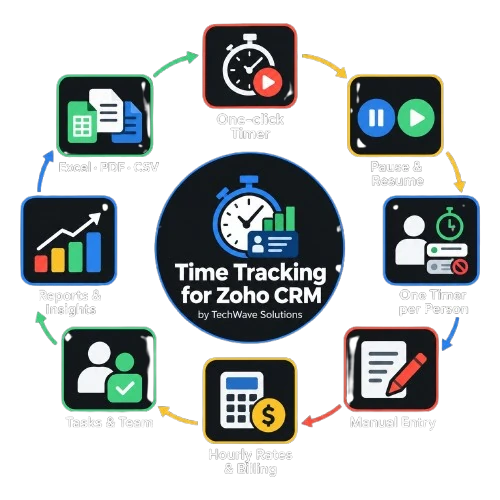

Time Tracking for Zoho CRM — full walkthroughVideo · YouTube
See Time Tracking in action.
Watch a timer run on a Deal, see hourly rates turn into billable amounts, and export the report — all without leaving Zoho CRM.
- One-click timer on Deals, Leads, Contacts and Accounts
- Per-person rates and automatic billable amounts
- Reports with Excel, PDF and CSV export
- Your data stays in your own Zoho CRM
Everything you need to bill accurately
Built for services teams who invoice by the hour and are tired of reconstructing timesheets from memory.
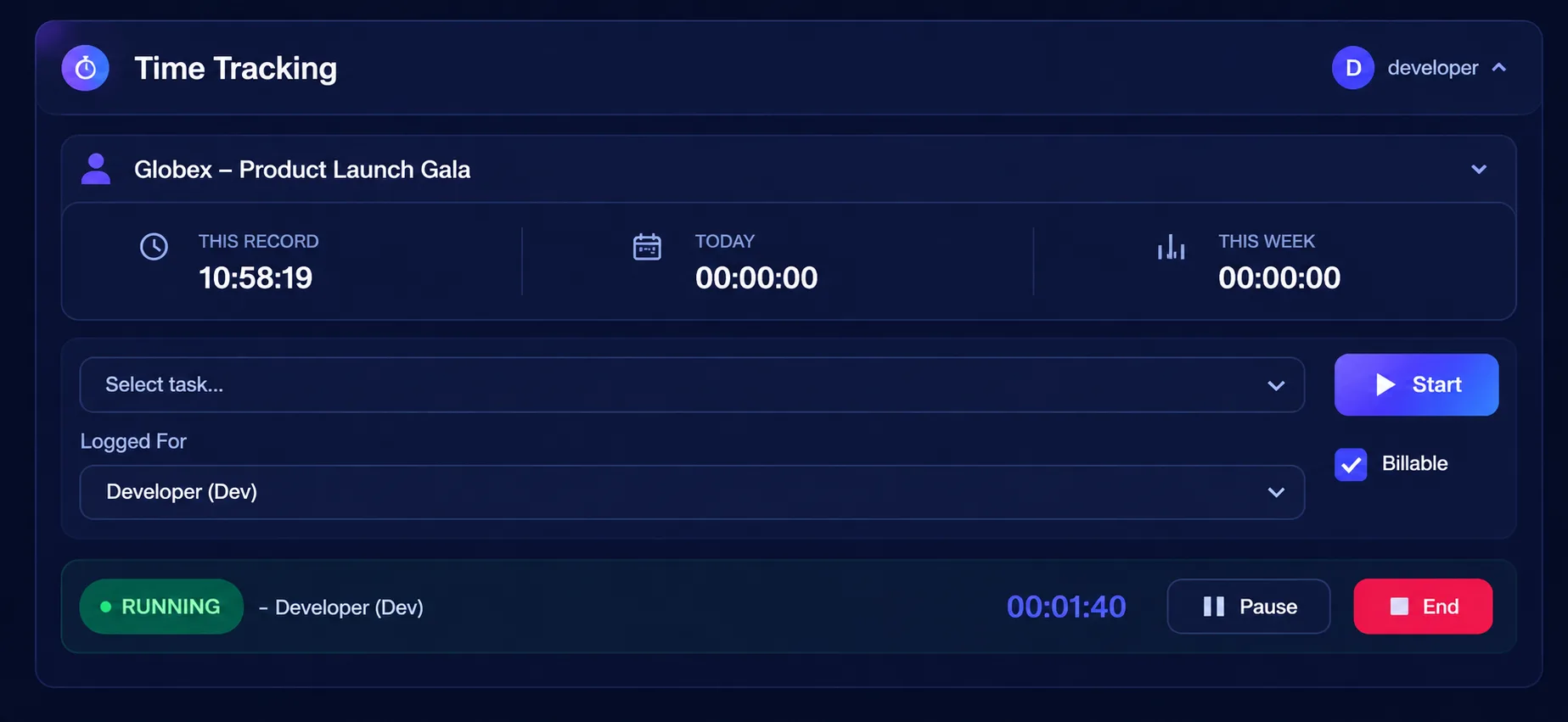
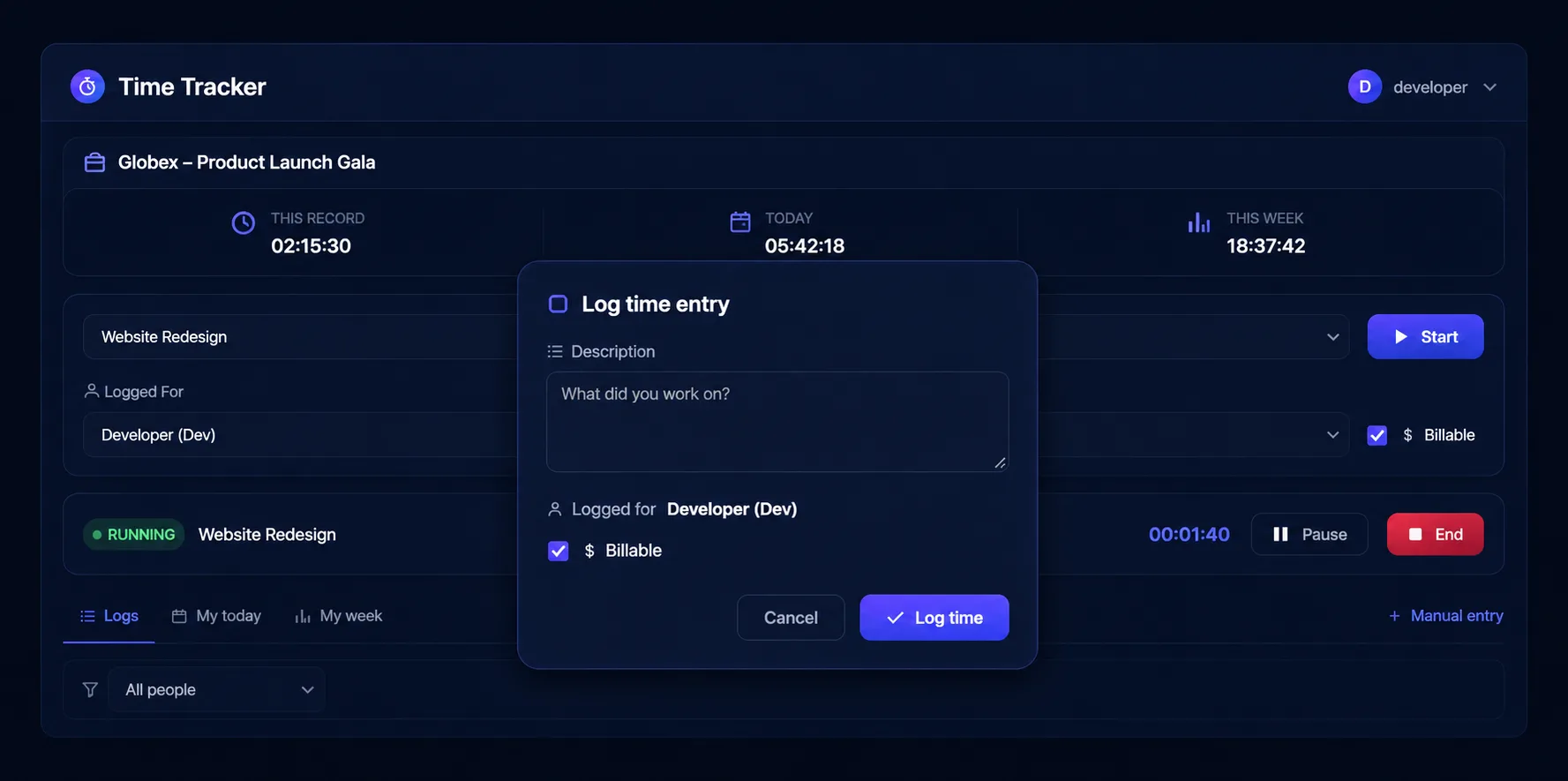
A one-click timer on any record
Start, pause, resume and end a timer on a Deal, Lead, Contact or Account. It works as a panel inside the record, so there is nothing to switch to.
- Works on Deals, Leads, Contacts and Accounts
- Choose who the time is for and which task it belongs to
- No separate login, no external app
Billable amounts, calculated for you
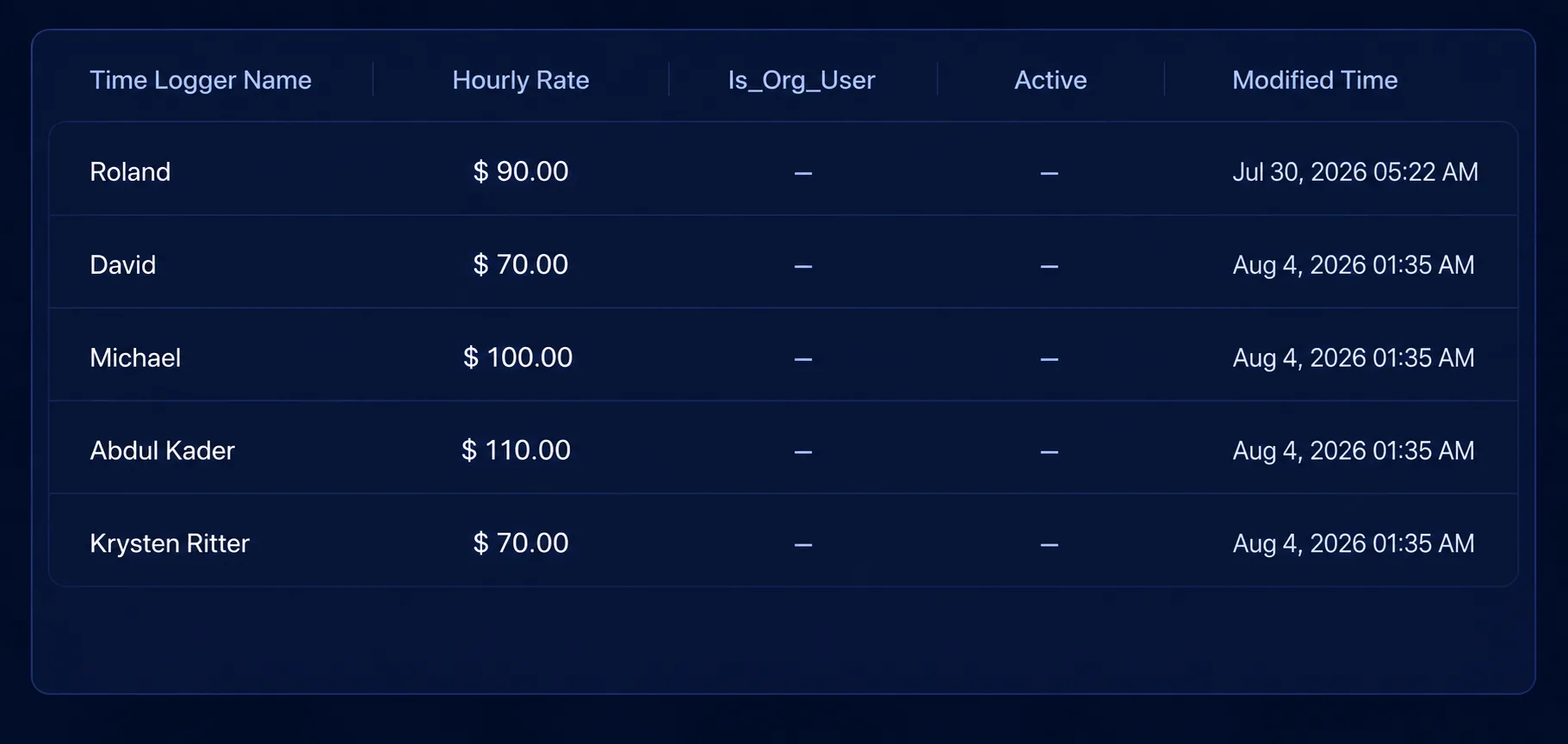
Each person has an hourly rate, and hours × rate is calculated for you on every entry.
- The rate is saved with each entry, so changing a rate later never changes past billing
- Non-billable work is kept out of the billable total
- Edits keep the rate the entry was logged at
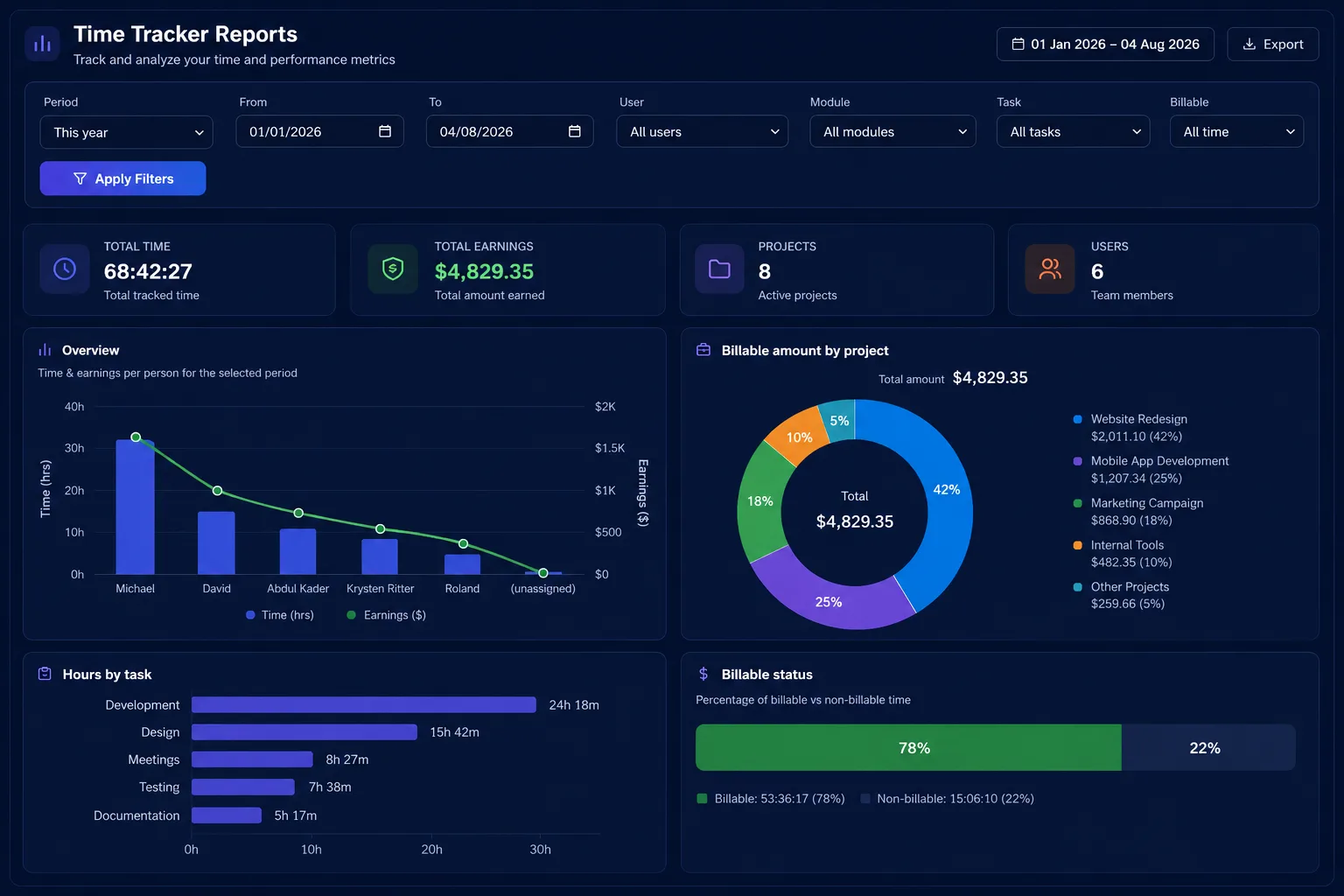
Reports that drive invoices
Total time, total earnings, records with time logged and team members — all in one tab, ready for invoicing or payroll.
- Charts: time & earnings per person, hours by task, billable vs non-billable, billable amount by record
- Top records, tasks, users and modules, plus a full activity list
- Filter by period (today, week, month, quarter, year or custom), user, module, task and billable status
Everything around the timer
Swipe to see all 8 features →
Manual time entry
- Add the date, duration, task and description by hand
Edit & delete entries
- Change date, duration, task, description or billable flag
- Or delete it, from the same panel
- Edits keep the rate the entry was logged at
Tasks
- Create tasks and tag them to modules
- A task tagged to Deals does not appear on Leads
- Deactivate a task without deleting history
Time Loggers
- Track time for Zoho CRM users and contractors with no CRM login
- Sync New User creates a Time Logger for every CRM user in one click
Logs & totals on every record
- Total time on the record, today and this week
- Tabs for Logs, My today and My week
- Filter the list by person
Export to Excel, PDF & CSV
- Export the filtered report to .xlsx, PDF or CSV
- Ready for invoicing or payroll
Admin controls
- Choose which modules track time
- Choose who can see everyone’s time — everyone else sees only their own
- The User filter shows only to people with full report access
Your data stays in your CRM
- Stored in your own Zoho CRM modules: Time Logs, Time Loggers and Time Tracker Tasks
- No external servers and no tracking
See every feature in action
A closer look at the timer, people & rates, reports and more — right inside Zoho CRM.
From click to invoice in three steps

Open a record
Open a Deal, Lead, Contact or Account and choose the person and task.
Start, then End
Press Start, then End when you’re done — or add the time manually.
Report & export
Open the Time Tracker Report tab to see totals and export.
Product specifications
- Product
- Time Tracking for Zoho CRM
- Publisher
- TechWave Solutions — Official Zoho Partner
- Platform
- Zoho CRM — runs as a panel inside the record; no separate account
- Supported modules
- Deals, Leads, Contacts, Accounts
- Tracking
- One-click timer (start / pause / resume / end), manual entry, edit & delete
- Billing
- Per-person hourly rates saved with each entry; hours × rate calculated automatically; billable / non-billable
- Tasks & people
- Module-tagged tasks; Time Loggers for CRM users and outside contractors; Sync New User
- Reporting
- Totals, charts, top lists and activity; filter by period, user, module, task and billable status
- Export
- Excel (.xlsx), PDF, CSV
- Access control
- Admins choose which modules track time and who sees everyone’s time; everyone else sees only their own
- Data & privacy
- Stored in your own Zoho CRM modules (Time Logs, Time Loggers, Time Tracker Tasks). No external servers, no tracking.
Private by design. Time Tracking runs entirely inside Zoho CRM as the signed-in user. The only data that leaves your org is a simple install / uninstall notification (the installer’s name and email) so we can support you.
Frequently asked
Can’t find what you’re looking for? Our team replies within one business day.
Deals, Leads, Contacts and Accounts. An admin chooses which of these modules track time, and each entry is tied to the specific record so your reports show exactly where the time went.
Yes. Add them as Time Loggers with their own hourly rate and log time for them — no extra CRM seats needed. For your CRM users, Sync New User creates their Time Loggers in one click.
Nothing. The rate is saved with each entry, so changing a rate later never changes past billing — and editing an entry keeps the rate it was logged at.
Yes. From the same panel you can change a completed entry’s date, duration, task, description or billable flag, or delete it.
Everyone sees only their own time by default. Admins choose who can see everyone’s time, and the User filter shows only to people with full report access.
Excel (.xlsx), PDF and CSV. The export follows the filters you set in the Time Tracker Report tab.
No. Time data is stored in your own Zoho CRM modules — Time Logs, Time Loggers and Time Tracker Tasks. There are no external servers and no tracking.
Yes. Use Manual entry to add the date, duration, task and description by hand.
Start tracking billable time today
Install Time Tracking for Zoho CRM and never guess where the hours went again.
Time Tracking for Zoho CRM · Built and supported by TechWave Solutions, an Official Zoho Partner
support@techwavesolutions.net