
WordPress to Zoho SalesIQ Integration
FormBridge for Zoho Pro
A WordPress to Zoho SalesIQ integration sends the details someone types into your form — name, email, phone — to Zoho SalesIQ, so the visitor stops being anonymous and your chat team knows who they are talking to.
This guide shows how to set up the Zoho SalesIQ destination in FormBridge for Zoho: choose the app and the module, map your form fields to the visitor fields, add fixed values where the form has none, set optional conditional logic, then create the feed.
The Zoho SalesIQ destination is part of FormBridge for Zoho Pro. See how to install Pro and activate your licence.
Supported form plugins and Zoho apps
FormBridge for Zoho connects these WordPress form plugins with your Zoho apps. This guide covers the Zoho SalesIQ destination.
WordPress form plugins
- Elementor Forms
- Contact Form 7
- WPForms
- Gravity Forms
- Fluent Forms
- Ninja Forms
- Forminator Forms
- Formidable Forms
- Happyforms
- SureForms
Zoho apps
- Zoho CRM
- Zoho Books
- Zoho Desk
- Zoho Bigin
- Zoho Campaigns
- Zoho Marketing Automation
- Zoho Inventory
- Zoho FSM
- Zoho People
- Zoho Creator
- Zoho Recruit
- Zoho Projects
- Zoho Sheet
- Zoho Sign
- Zoho Analytics
- Zoho Cliq
- Zoho SalesIQ
Before you start
- FormBridge for Zoho Pro is installed and your licence is active.
- Your WordPress form is published and its trigger is set up in FormBridge for Zoho.
- Your Zoho account is authorised for Zoho SalesIQ under FormBridge for Zoho → Connections. If it isn’t, follow the guide to creating a Zoho connection.
- Your form collects at least an email address, since that is what identifies the visitor in SalesIQ.
How to set up a WordPress to Zoho SalesIQ integration
Once your form trigger and feed details are ready, follow these five steps. SalesIQ is one of the shortest destinations to set up: there is no Organization dropdown and no destination settings panel.
Step 1: Select Zoho SalesIQ as the Zoho app
Destination › Zoho appOn the Destination step, open the Zoho app dropdown and select Zoho SalesIQ. The dropdown lists every app your account is authorised for, so scroll down past the record apps to find it.
Zoho SalesIQ not in the list?The connection must include Zoho SalesIQ. Open FormBridge for Zoho → Connections, choose Edit access for the account, tick Zoho SalesIQ and reauthorise. Zoho grants only the permissions asked for when a connection is made.
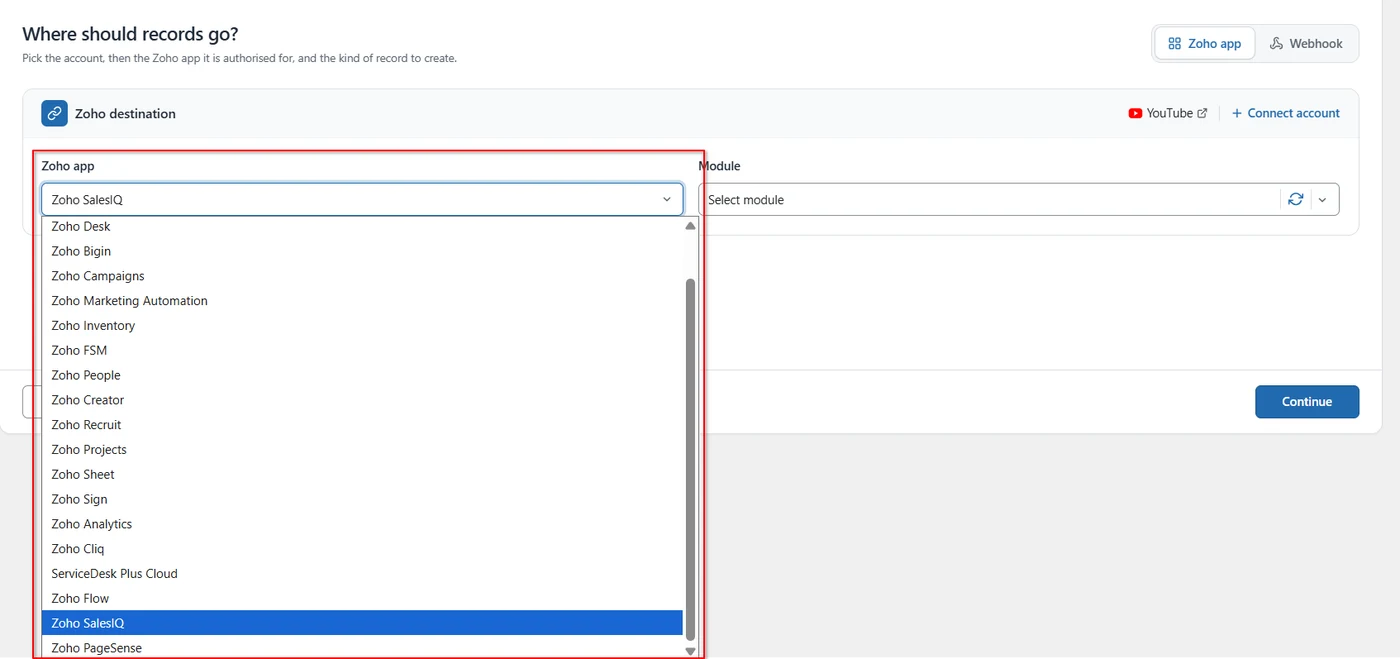
Selecting Zoho SalesIQ as the Zoho app. Step 2: Select the module
Destination › ModuleOpen the Module dropdown and choose Visitor: set name, email, phone and details. SalesIQ has this one module, so there is nothing to weigh up — it is what sends the submitted details across as the visitor’s identity.
Click Continue to move on to the mapping step.
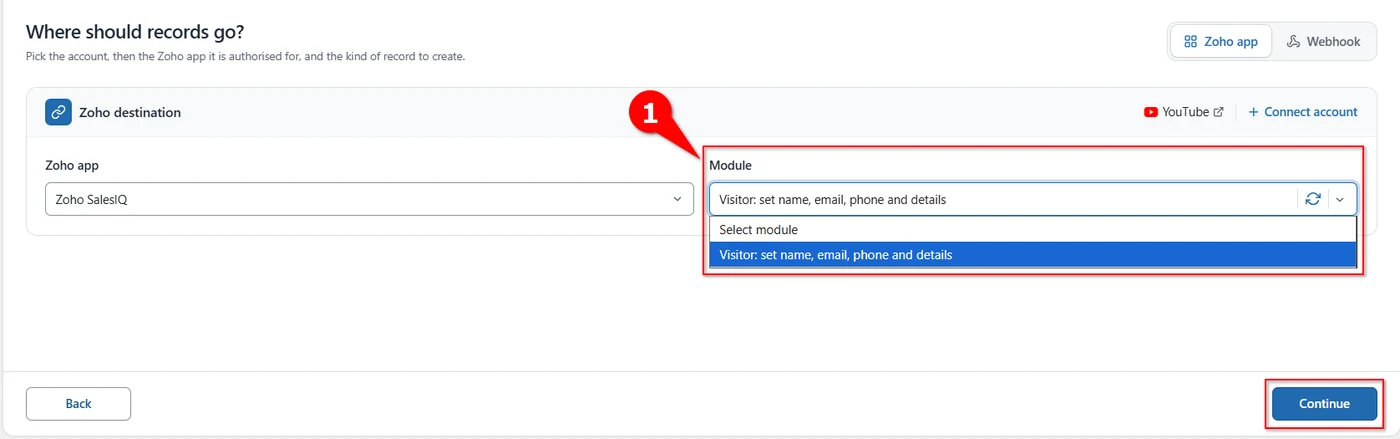
Choosing the visitor module, then continuing. Step 3: Map the visitor fields
Mapping › Field mappingOn the Mapping step, give each Zoho field a form field. Both lists load on their own: the Zoho fields come from the module, and the form fields from your form.
On each row, leave Source as Form field, pick the form field in the second column, then pick the SalesIQ field it should fill — your form’s Name into Name, Email into Email. Use Remove to drop a row you don’t need.
Map email firstEmail is what ties the submission to a visitor in SalesIQ. Map it even if you map nothing else.
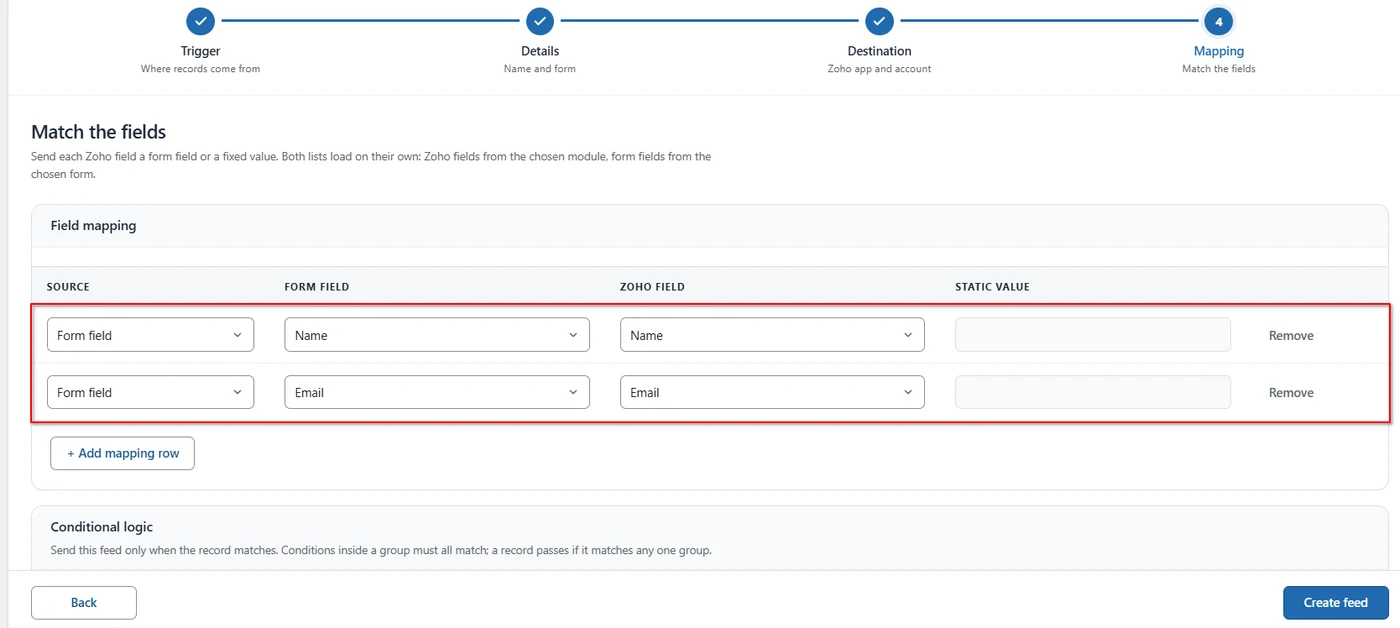
Mapping the form’s name and email to the visitor fields. Step 4: Send fixed values and add more rows
Mapping › Static valueClick + Add mapping row to fill more visitor fields. To send the same value every time, set Source to Static value: the form field column greys out and you type the value in the Static value box instead — a shared Phone number, for instance, on a form that doesn’t ask for one.
A static value is the same for everyoneUse a static phone number only when it genuinely belongs to every submission. If the form collects a phone number, map the form field instead, or every visitor in SalesIQ ends up with the same one.
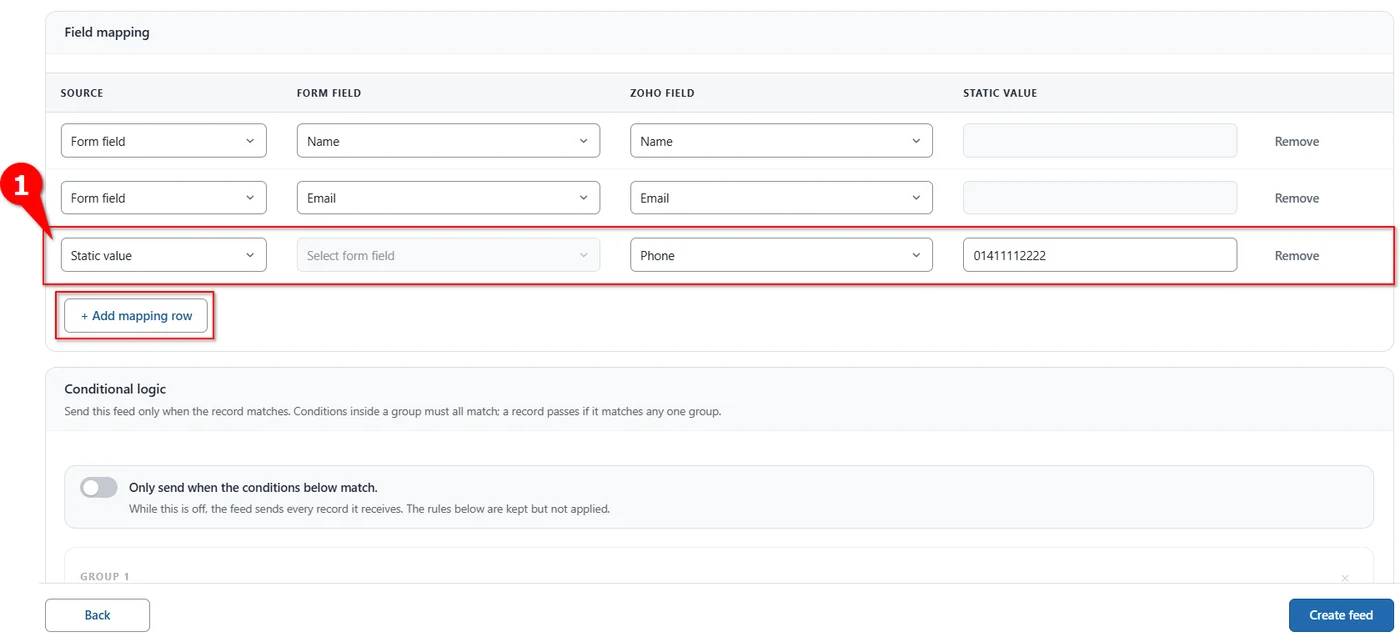
Sending a fixed phone number with a static value. Step 5: Set conditions and create the feed
Mapping › Conditional logic and Create feedConditional logic lets a feed send only the submissions you want. Turn on Only send when the conditions below match, then build your rules: conditions inside a group must all match, and a record passes if it matches any one group. While the switch is off the feed sends every record it receives, and any rules you have written are kept but not applied.
Read the full conditional logic guide →
When the mapping is ready, click Create feed. The feed starts listening to the selected form straight away, so submit the real form once and check the visitor in SalesIQ.
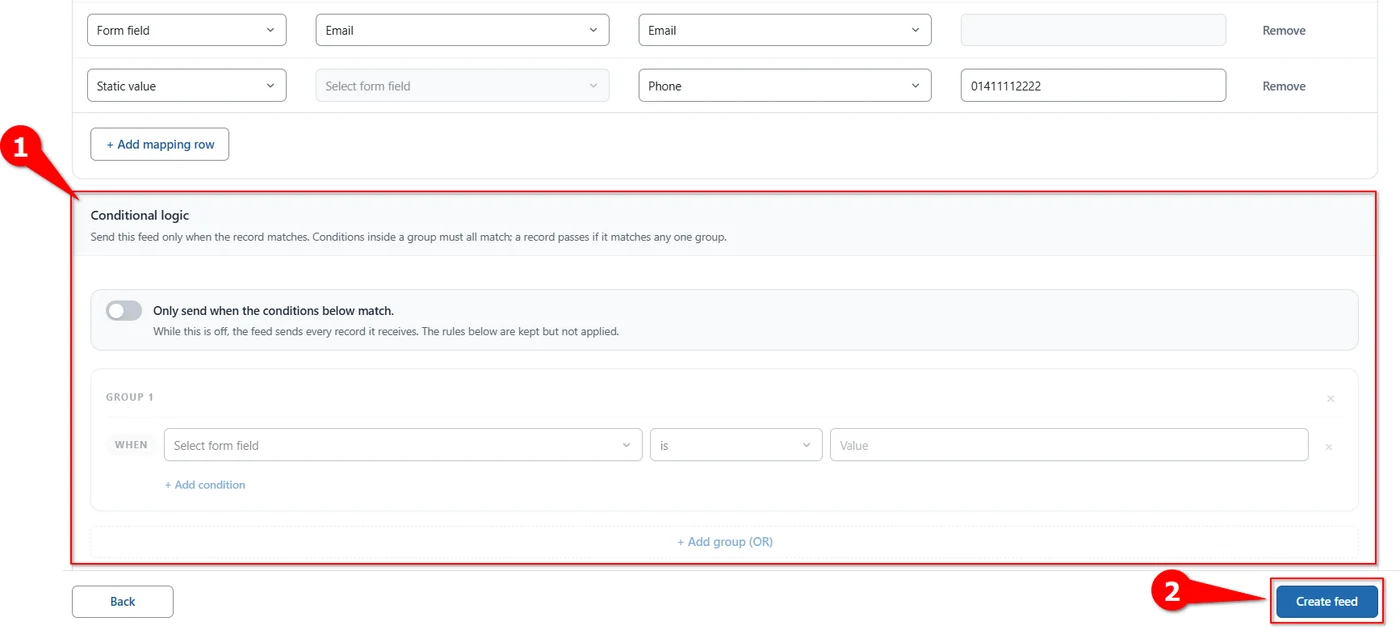
Setting conditional logic, then creating the feed. Delivery logsEvery delivery, successful or failed, is recorded under FormBridge for Zoho → Logs. Failed deliveries can be sent again with Resubmit.
- One feed listens to exactly one form. For a second form, create a second feed.
- Changing the app or module after mapping clears the mapping rows, so set those first.
- SalesIQ is about identifying the person chatting on your site. If you also want a CRM or Desk record from the same submission, add a separate feed for it.
Verify the integration
- Submit the real form with your own name and email address.
- Check the log under FormBridge for Zoho → Logs and confirm the delivery succeeded.
- Open Zoho SalesIQ and find the visitor.
- Check the details: the name, email, phone and anything else you mapped.
- Submit again with a different name to confirm the feed keeps working.
Troubleshooting
Pick the symptom you’re seeing to get the fix.
Nothing reaches Zoho SalesIQ
- Likely cause
- The feed never ran, or SalesIQ rejected the request.
- How to fix it
- Open FormBridge for Zoho → Logs. No entry means the trigger didn’t fire, so check the form selected on the Trigger step. A failed entry shows the error SalesIQ returned.
Zoho SalesIQ missing from the dropdown
- Likely cause
- The connection was authorised before SalesIQ was added.
- How to fix it
- Open Connections → Edit access for the account, tick Zoho SalesIQ and reauthorise.
The module list is empty
- Likely cause
- The list was loaded before the app was fully authorised.
- How to fix it
- Use the reload button beside the Module dropdown. If it stays empty, reauthorise the connection with SalesIQ ticked.
The visitor has no name or email
- Likely cause
- The mapped form field was empty on that submission.
- How to fix it
- Check the mapping rows point at the right form fields, and make those fields required on the form itself so they are never blank.
Every visitor has the same phone number
- Likely cause
- Phone is mapped as a static value.
- How to fix it
- Change that row’s Source back to Form field and pick the form’s phone field, or remove the row.
A Zoho field is missing from the list
- Likely cause
- The field list was loaded before the module was selected.
- How to fix it
- Go back to the Destination step, reload the Module list, select the module again and return to the mapping step.
Still stuck? Email the failed entry from the Logs screen to support@techwavesolutions.net.
Frequently asked questions
What does the Zoho SalesIQ destination do?
It sends the visitor’s details — name, email, phone and anything else you map — to Zoho SalesIQ when the form is submitted, so the chat record carries a real identity instead of an anonymous visitor.
How many modules does Zoho SalesIQ have?
One: Visitor: set name, email, phone and details. The Module dropdown holds that single option, so there is nothing to choose between.
Why is there no Organization dropdown for Zoho SalesIQ?
SalesIQ does not use one in FormBridge. The destination row goes straight from the Zoho app to the module.
Can I send a value that is not on the form?
Yes. Set Source to Static value on a mapping row, leave the form field column empty and type the value in the Static value box. It is sent with every submission.
Which fields should I map first?
Email is the one that matters most, because it identifies the visitor. Map name next, then phone and any further details you collect.
Can the same form also create a CRM record?
Yes, with a second feed on the same form pointing at Zoho CRM. One feed sends to one destination.
